 SpockOps
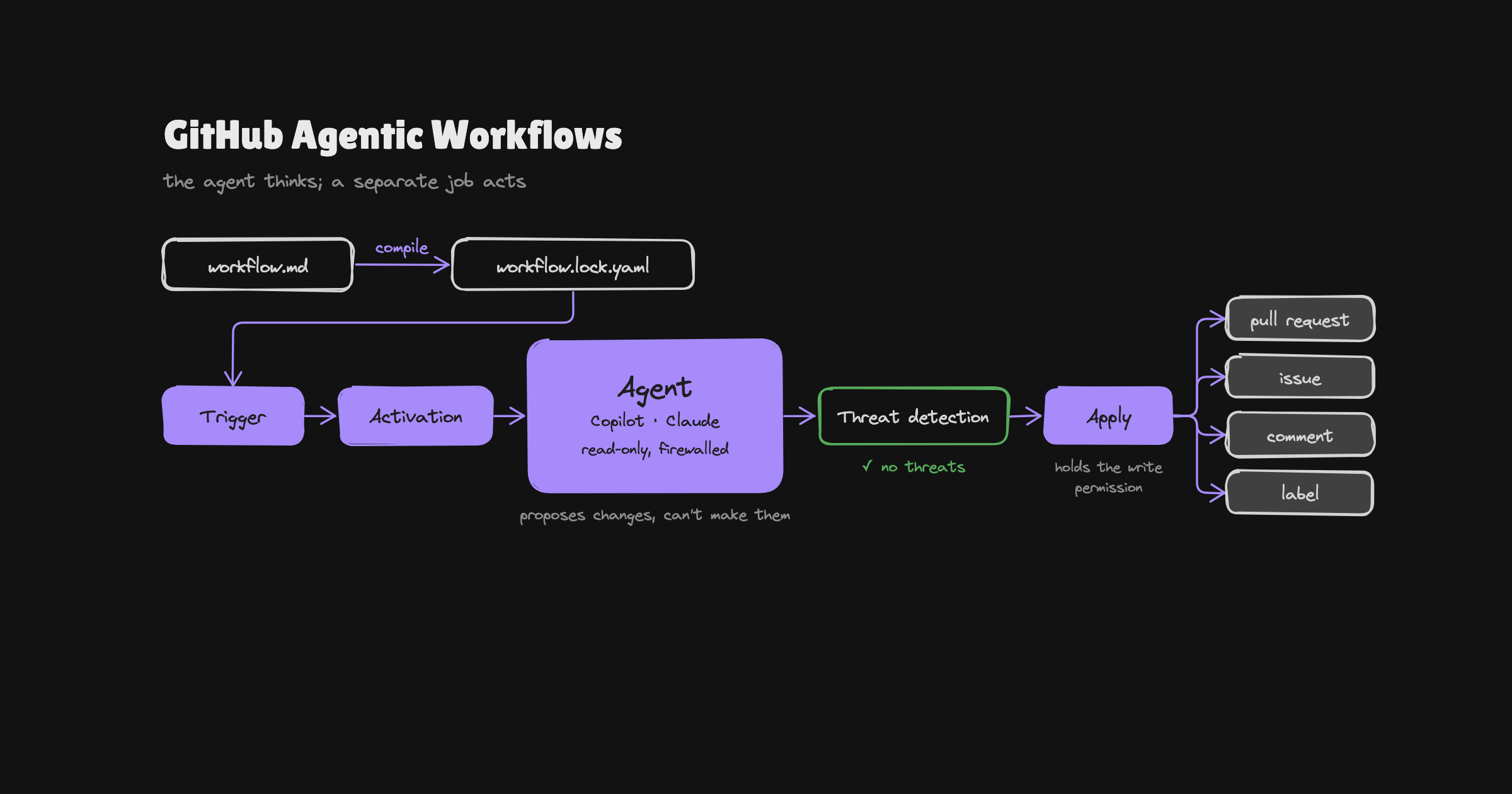

GitHub Agentic Workflows let a team describe a repository task in plain language and have an AI agent carry it out on GitHub Actions. The description is turned into an ordinary workflow, the agent runs inside a protected environment, and any change it wants to make is checked before it is applied. GitHub's documentation calls them "AI-powered repository automations that you define in markdown and run as GitHub Actions workflows."
The idea is new enough that many engineers who know Actions well have not yet used it. The feature is in public preview, and GitHub introduced it under the name "Continuous AI" in February 2026. This post explains, without assuming prior knowledge, how an agentic workflow is written, what happens when it runs and how it is kept safe.
What problem do agentic workflows solve? #
They handle the repository work that requires judgment rather than a fixed sequence of commands.
Conventional CI is very good at deterministic tasks. Given the same code, a build, a test suite or a release script does the same thing every time, and that predictability is the point. A great deal of the work around a repository is not like that. Deciding which label a new issue deserves, noticing that the documentation no longer matches the code, or working out why a test began failing all require reading, interpretation and a decision.
Until recently, that work fell to people or to brittle scripts full of special cases. Agentic workflows hand it to an AI agent that can read the repository, reason about it and propose a response. GitHub is explicit that they are meant to augment existing CI/CD rather than replace it: builds, tests and releases remain conventional workflows.
How is an agentic workflow written? #
An agentic workflow is a single Markdown file with two parts: a short block of settings at the top, and plain-language instructions below it.
The instructions are written as one would brief a capable colleague. For a triage workflow they might read: "When a new issue is opened, read it, decide whether it is a bug, a feature request or a question, apply the matching label and ask for more detail if the report is incomplete."
The settings describe the boundaries around that work. They say when the workflow runs, which AI provider and model it uses, what it may read, which kinds of change it may propose and how much it may spend. According to GitHub's documentation, repository access is read-only unless more is granted, and any change the agent may make must be declared in advance.
The Markdown file is then compiled, using gh-aw's command-line tool, into a standard Actions workflow file with security hardening applied. Both files are committed to the repository. From that point the agentic workflow behaves like any other workflow: it can run on a schedule, in response to an event such as a new issue, or on demand.
What happens when one runs? #
A run passes through a short sequence of separate jobs, each with a narrow purpose. Following GitHub's security architecture write-up and gh-aw's threat detection reference, the sequence is:
- The trigger. An event, a schedule or a person starts the workflow, as with any Actions workflow.
- Activation. A brief preliminary job confirms the run should proceed, for example that it is within its daily spending limit.
- The agent. The agent reads the instructions and the repository and does its work inside an isolated container. It can read, but it cannot change anything directly. Instead, it writes down the changes it would like to make.
- Threat detection. A separate job examines those proposed changes for signs of prompt injection, leaked secrets or malicious code. If it finds a threat, the run fails and nothing is applied.
- Applying the changes. Only then does a final job, which holds the necessary permissions, carry out the approved changes: adding a label, posting a comment or opening a pull request.
The essential design choice is the separation between thinking and acting. The agent that reads untrusted text never holds the credentials to change the repository, and the job that holds those credentials never runs the agent.
How is an agent kept safe? #
By several independent layers, each of which limits what a mistaken or misled agent could do.
The risk they address is specific. An agent reads text that anyone may write: issue reports, comments, pull requests, web pages. Some of that text may be written deliberately to mislead it, a technique known as prompt injection. gh-aw is designed on the assumption that this will sometimes succeed, and limits the consequences.
- Read-only by default. The agent can read the repository but cannot change it unless more access is explicitly granted.
- Isolation. The agent runs in its own container behind a firewall, and can reach only the network locations it has been permitted.
- Declared changes only. The agent can propose only the kinds of change listed in the workflow's settings, such as adding a label or opening a pull request.
- Threat detection. Proposed changes are examined before they are applied, and a run with suspicious output stops.
- Separated credentials. The credentials that can change the repository live in a later job that never runs the agent.
- Strict mode. By default, workflows are compiled in a strict mode that turns known risky patterns into errors rather than warnings.
Each of these protections is a setting of the individual workflow, with secure values by default. That is a sensible design for a single workflow, and it has consequences for organizations with many, to which this post returns below.
Which AI models can it use, and who pays? #
An agentic workflow can use any of four AI providers, and its cost has two parts.
GitHub's documentation lists GitHub Copilot, Anthropic's Claude, OpenAI's Codex and Google's Gemini as supported engines, with Copilot as the default. Each workflow names its engine in its settings, and each engine needs its own credentials.
The cost of a run is the sum of the GitHub Actions minutes its jobs use and the AI usage of its agent. The minutes are billed by GitHub at its standard runner rates. The AI usage is billed by the provider: Copilot usage by GitHub, measured in AI Credits worth $0.01 each, and the other engines by Anthropic, OpenAI or Google directly. gh-aw sets a default limit of 1,000 AI Credits per run, which each workflow can change.
In practice, the AI usage is usually by far the larger part. A worked example, with a run priced line by line, is in What does an agentic workflow cost?
What are teams using it for? #
The common thread is recurring work that needs reading and judgment. GitHub's announcement and documentation describe uses such as these:
- Issue triage. Summarizing, labeling and routing new issues as they arrive.
- Documentation upkeep. Noticing when code changes leave the documentation out of date, and proposing corrections.
- CI investigation. Examining a failed build, identifying the likely cause and suggesting a fix.
- Test improvement. Assessing coverage and proposing tests where they would be most valuable.
- Code simplification. Identifying improvements and opening pull requests for review.
- Status reporting. Producing a daily or weekly summary of a repository's health and activity.
In each case the agent proposes and a person decides. A label can be changed, a comment ignored and a pull request declined, which is part of why these tasks suit an agent well.
What changes when there are many? #
With one agentic workflow, everything described above can be checked by reading a single file. With fifty, two new questions arise.
The first is consistency. Because each protection and each choice of provider, model, credentials and budget belongs to its own workflow, different teams will make different choices over time. Some will be deliberate and some accidental. An organization needs a way to state its rules once and confirm that every workflow still follows them. SpockOps' agentic policies do this, as GitHub Actions workflow governance describes.
The second is cost. Each workflow reports its own spending, and AI usage may be billed by several providers on separate invoices. An organization needs to see the total, by workflow and by team. That is the subject of What does an agentic workflow cost?
Neither question reflects a weakness in gh-aw. Both are the ordinary consequences of a useful tool being adopted widely, and both are the problems SpockOps was built to address.
Where to begin #
Start with one low-risk task in one repository. According to GitHub's documentation, you will need:
- GitHub Actions enabled on the repository.
- An account with an AI provider; for Copilot, a GitHub Copilot plan.
- The GitHub CLI, installed and signed in, with the gh-aw extension.
Issue triage and a weekly status report are good first workflows: they are useful, easy to judge and simple to reverse. Read the run logs for the first few weeks to see what the agent does and what it costs.
When agentic workflows begin to spread across teams, SpockOps provides the organization-wide view: policies that every agentic workflow is checked against, and the cost of each one in runner minutes and AI usage. It requires no changes to your workflows.
Questions
What are GitHub Agentic Workflows?
They are repository automations in which an AI agent carries out a task described in plain language. Each one is written as a Markdown file, compiled into a standard GitHub Actions workflow and run like any other workflow.
Do agentic workflows replace CI/CD?
No. GitHub describes them as a complement to existing CI/CD. Builds, tests and releases remain conventional workflows; agentic workflows handle tasks that need judgment, such as triage and documentation.
Can an agent change my repository directly?
No. The agent has read-only access by default and can only propose the kinds of change its workflow declares. Proposed changes are checked for threats, then applied by a separate job that holds the necessary permissions.
Which AI models do agentic workflows support?
GitHub Copilot, Anthropic Claude, OpenAI Codex and Google Gemini. Copilot is the default, and each workflow chooses its own engine.
How much does an agentic workflow cost?
Each run costs the GitHub Actions minutes its jobs use plus the AI usage of its agent. The AI usage is billed by the provider and is usually the larger part.
Are GitHub Agentic Workflows generally available?
Not yet. As of October 2026, GitHub describes them as in public preview and subject to change.
Related posts
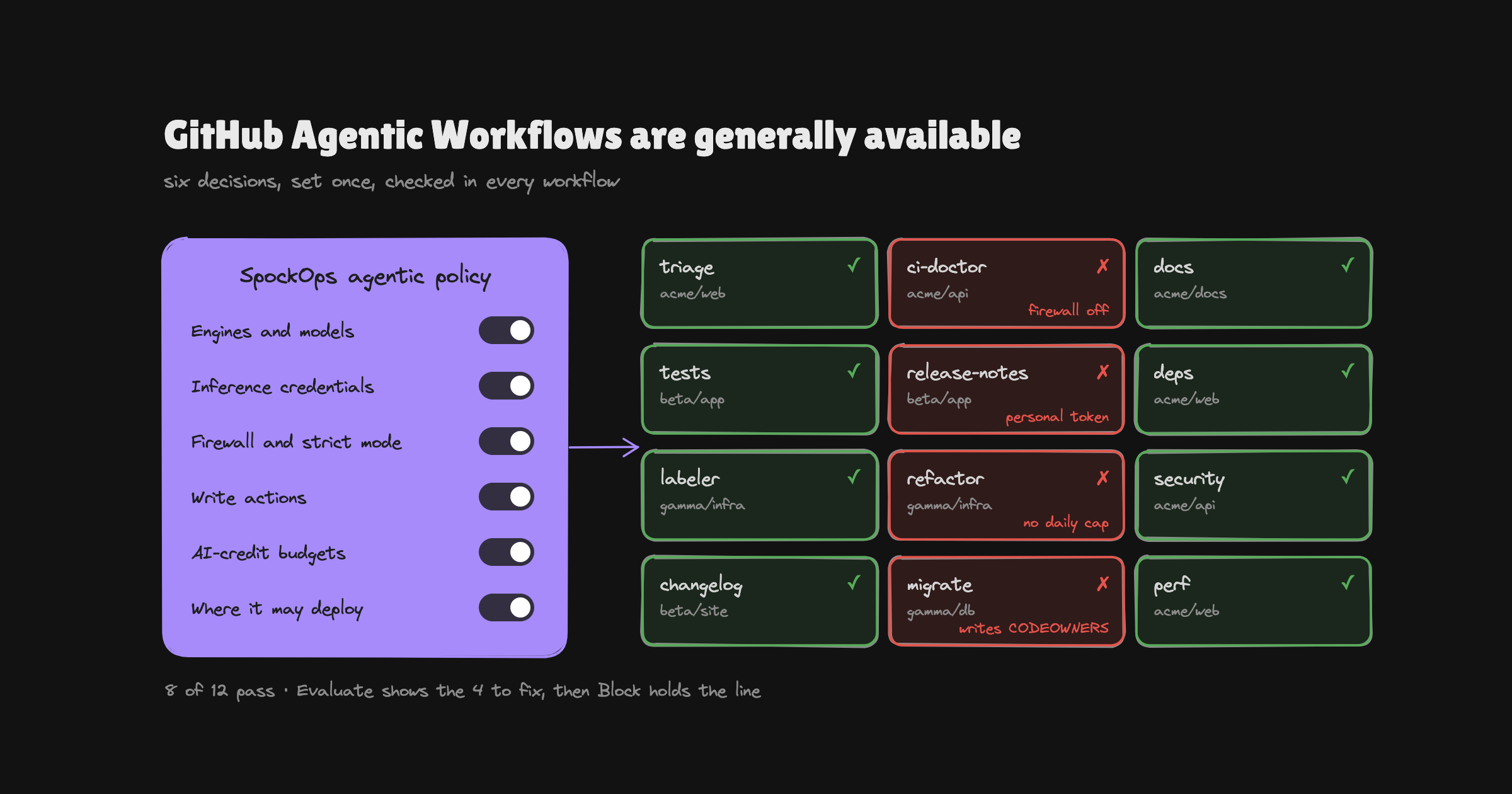
GitHub Agentic Workflows are generally available: six decisions before your teams turn them on
GitHub Agentic Workflows are generally available. The six decisions an enterprise should make first: engines, credentials, isolation, writes, spend and deployments.
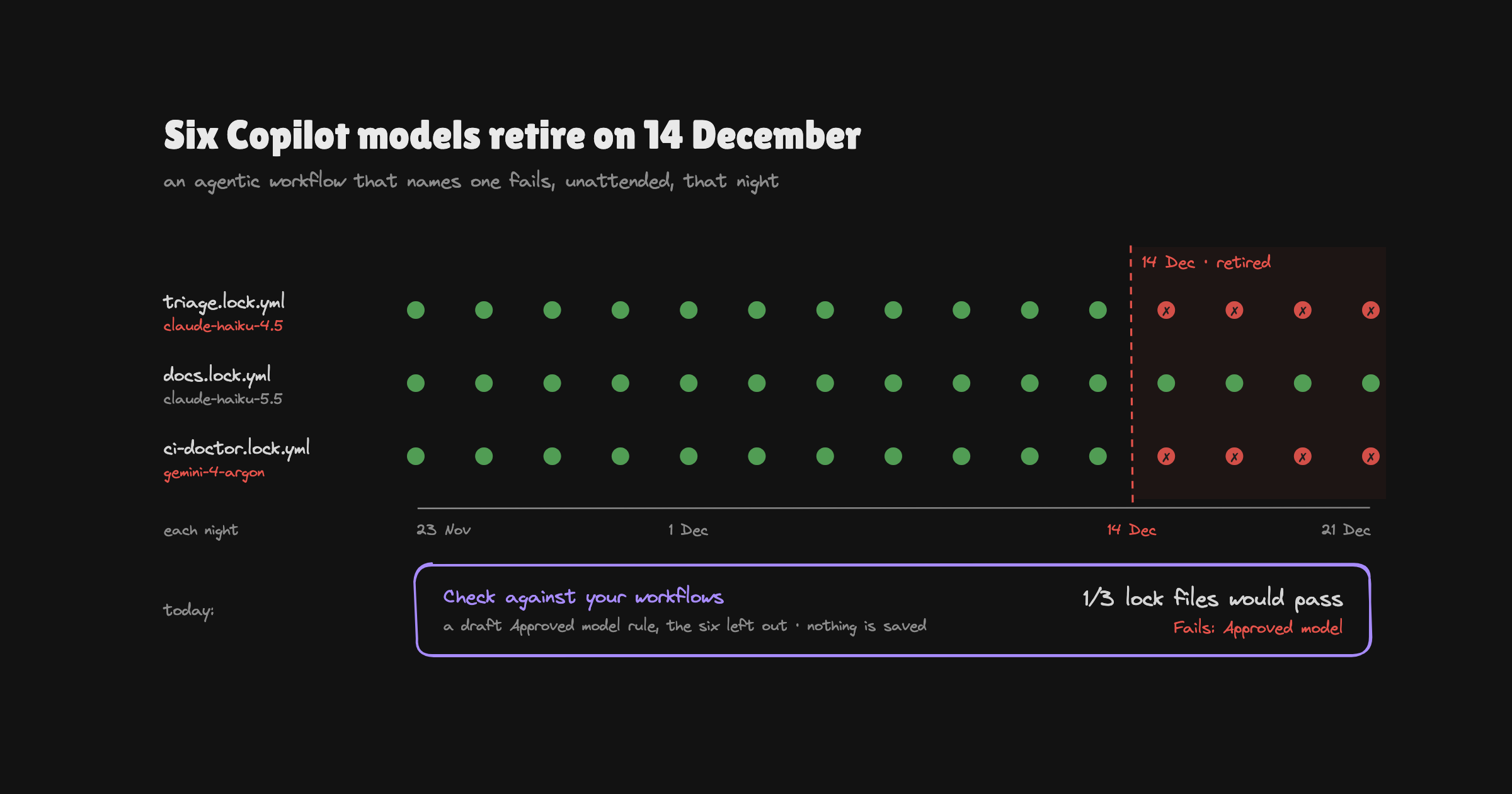
Six Copilot models retire on 14 December: which of your agentic workflows use one?
GitHub retires six Copilot models on 14 December 2026. An agentic workflow that names one will fail unattended. How to find them, switch safely and keep your model policy in step.
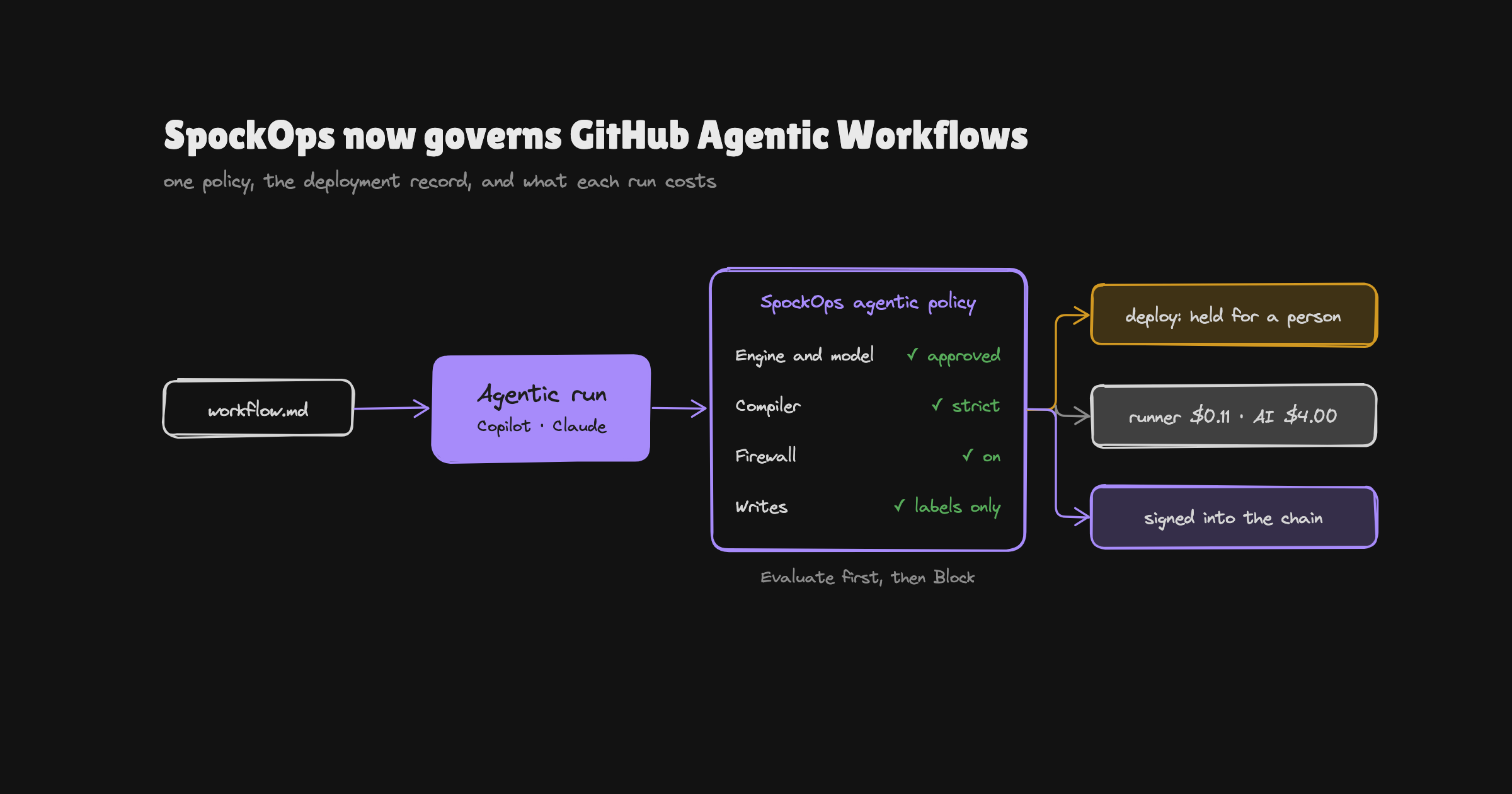
SpockOps now governs GitHub Agentic Workflows
SpockOps now governs GitHub Agentic Workflows. Approve engines, models and credentials, record every agent deployment and see what each run costs.
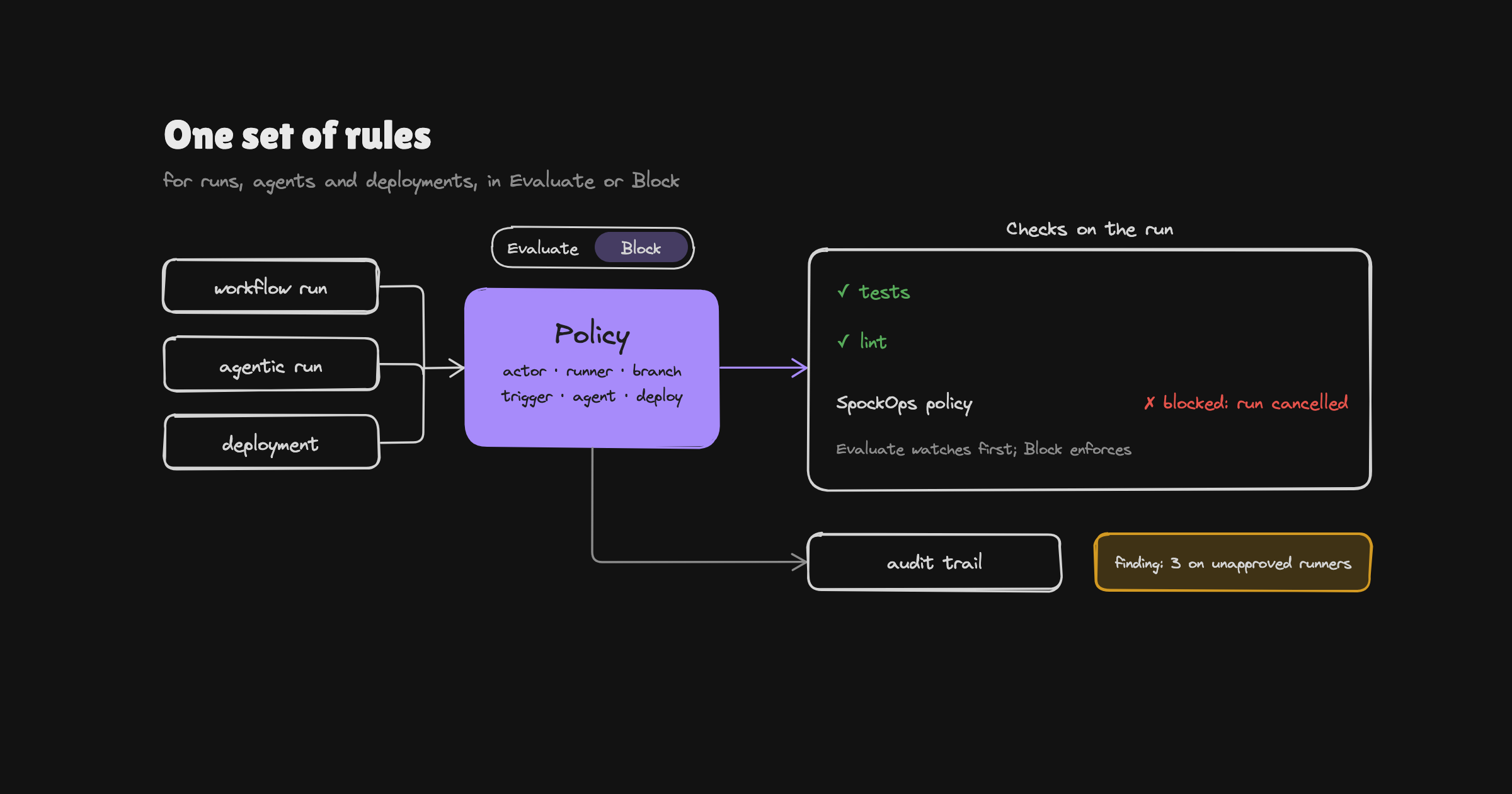
GitHub Actions workflow governance: one set of rules for runs, agents and deployments
Workflow governance for GitHub Actions: one engine for runs, agentic workflows and deployments, in Evaluate or Block, with findings that say what to fix next.
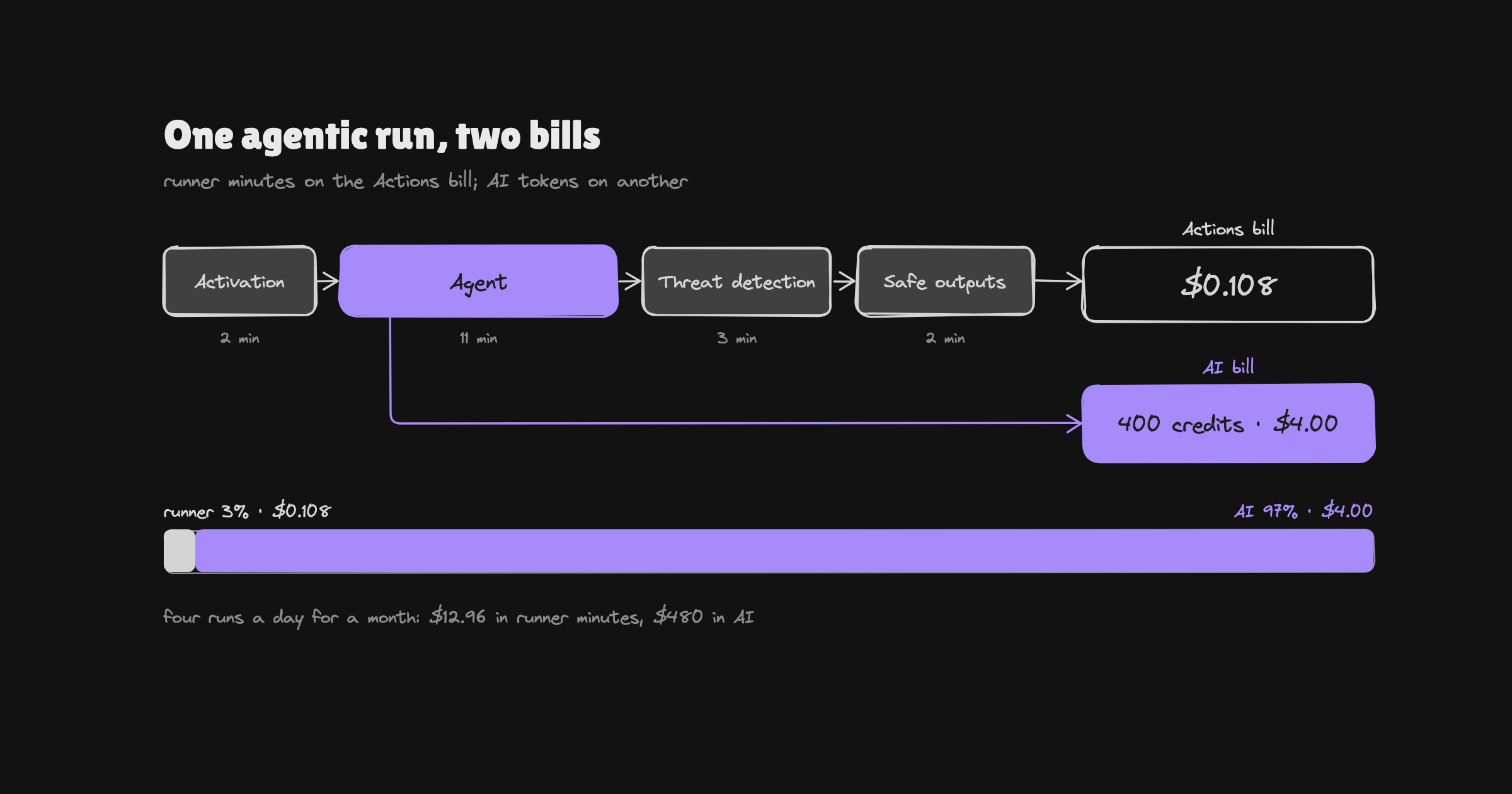
What does an agentic workflow cost? Runner minutes vs. AI tokens
Every GitHub agentic workflow run has two bills: Actions minutes and AI tokens. See a priced example and how SpockOps splits compute from agent cost per run.