 SpockOps
Self-hosted runners
Your machines aren't free.
Self-hosted runners never show up on the GitHub bill, so nobody knows if they're worth it. SpockOps pays each machine down to its break-even date and shows the whole fleet: how long jobs wait, how close you are to capacity, and what to move.
The machines
A line item nobody can defend
The machines were bought once, the power arrives on another bill, and the work they do never meets either. So when someone asks whether they were worth it, nobody has the answer.
-
Bought once
Worth $500 or $5,000?
A team knows it spent $1,500 on a build machine, but not how much work that machine has done since, or whether it's paid for itself.
-
Busy or idle
Queues beside empty machines
One label's jobs wait in a queue while another label's machines sit idle. Nobody sees both at once, so the fix stays obvious only in hindsight.
-
Gone in 14 days
History that disappears
GitHub removes a runner that's been offline for 14 days. A machine away for repairs comes back as a stranger, and its record goes with it.
Payback, per machine
Every machine, amortised like the asset it is
Two figures you enter and one SpockOps measures. We haven't found another tool that does this.
- Its purchase priceEntered once, when you register the machine.
- Its running costA fixed monthly figure for power and hosting.
- The work it doesMeasured: every job it runs, priced at what it would have cost on the equivalent GitHub-hosted runner.
- Its break-even dateEach month the work, less the running cost, pays the machine down. SpockOps projects the date it's paid for, and moves it as usage changes.
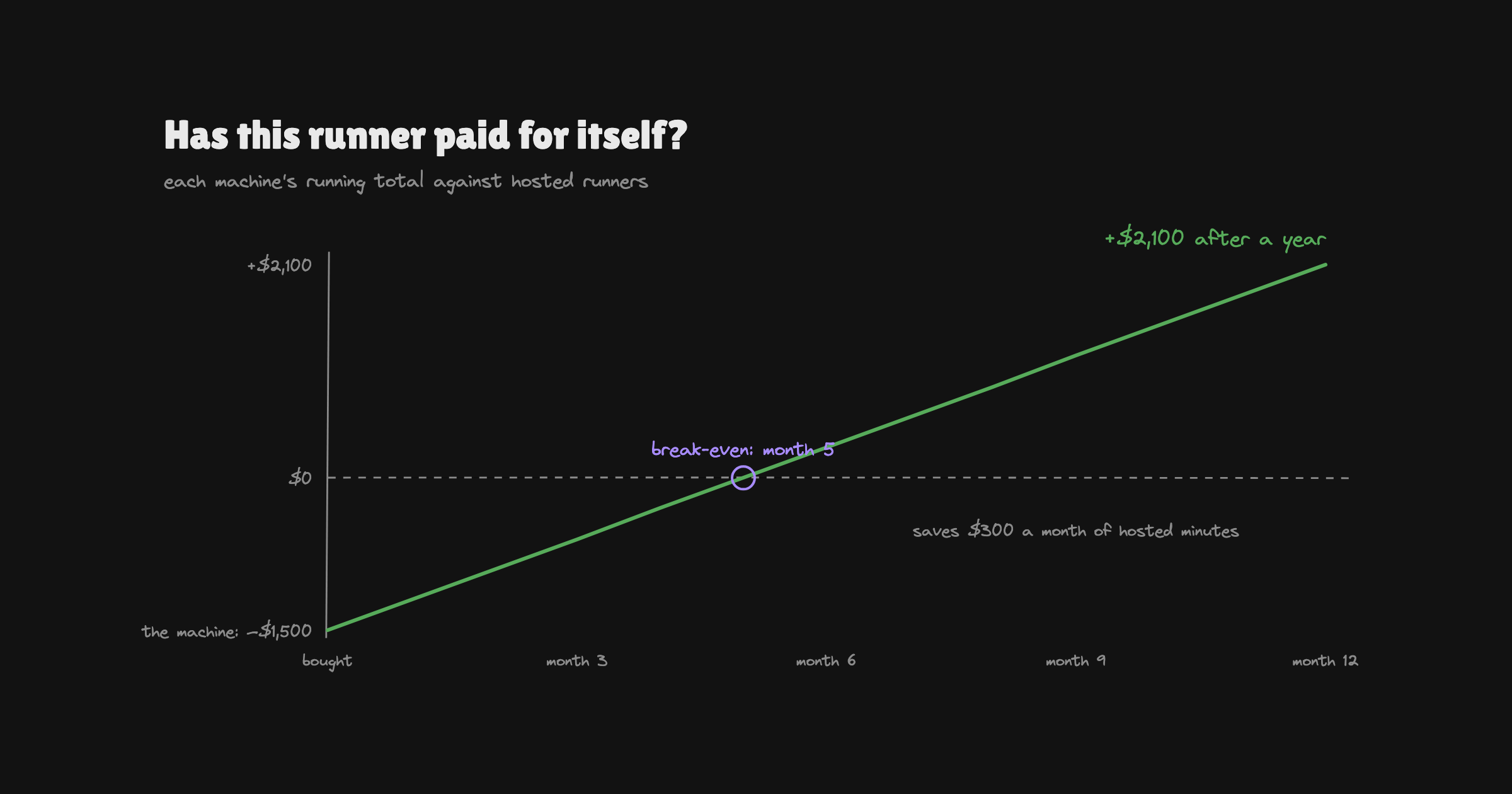
One machine, amortised
A Linux build machine, judged against the GitHub-hosted Linux runner it replaced.
- Hardware$1,440over 3 years
- =
- Amortised$40a month
- +
- Power and hosting$56a month
- =
- build-01 costs$96a month
- vs
- GitHub's runners$340a month
- →
- Saved$244pays back in about 5 months
The fleet dashboard
Every machine, every organization, one page
For the person who answers for the fleet: what it costs, what it's worth, how hard it's working and what to change next.
-
Alerts
What needs a look, worst first
- Machines offline, idle or failing jobs
- Labels waiting, or with no runner online
- Each with what was seen and what to do
-
Load
When they're busy, and when they're not
- Runner-hours beside load, hour by hour
- Busy, idle and offline time per machine
- Status, operating system and outcomes
-
Waiting
Queues beside failures
- Queue time by label, at the p95
- Failed jobs on the same axis
- So "slow" and "broken" are told apart
-
Health
Each machine, day by day
- A machine's jobs, outcomes and load per day
- The runners that came and went on it
- Its payback, recouped and still to go
-
Groups and labels
How the fleet is carved up
- Runner groups and label sets
- Which jobs each set can take
- Where a label has too few machines
-
Rebalance Lab
Try the change first
- Pairs an overloaded machine with an idle one
- Shows where both would land, and the labels to add
- A simulation: nothing changes until you do it
Beyond GitHub's runner list
What GitHub provides, and what SpockOps adds
GitHub runs your self-hosted runners and records which jobs ran on each. It doesn't price them, because it doesn't bill for them.
| Need | GitHub natively | SpockOps |
|---|---|---|
| Which jobs ran where | Each job's runner, in its logs and the API | Jobs attributed to each registered machine |
| The value of that work | Hosted rates in its pricing reference | Every job priced at the equivalent hosted rate for its operating system |
| The machine's cost | Not recorded | Purchase price and a fixed monthly running cost |
| Payback | Not provided | Recouped amount and a projected break-even date for each machine |
| The whole fleet | Runners listed per organization or repository | A fleet dashboard across every connected organization and account |
| Continuity | Runners removed after 14 days offline | A returning runner reassigned to its existing machine |
Further reading
The numbers, worked through
-
Have your self-hosted runners paid for themselves?
Self-hosted GitHub Actions runners look free because their minutes never reach the bill. A method, and a worked example, for finding each machine's break-even.
-
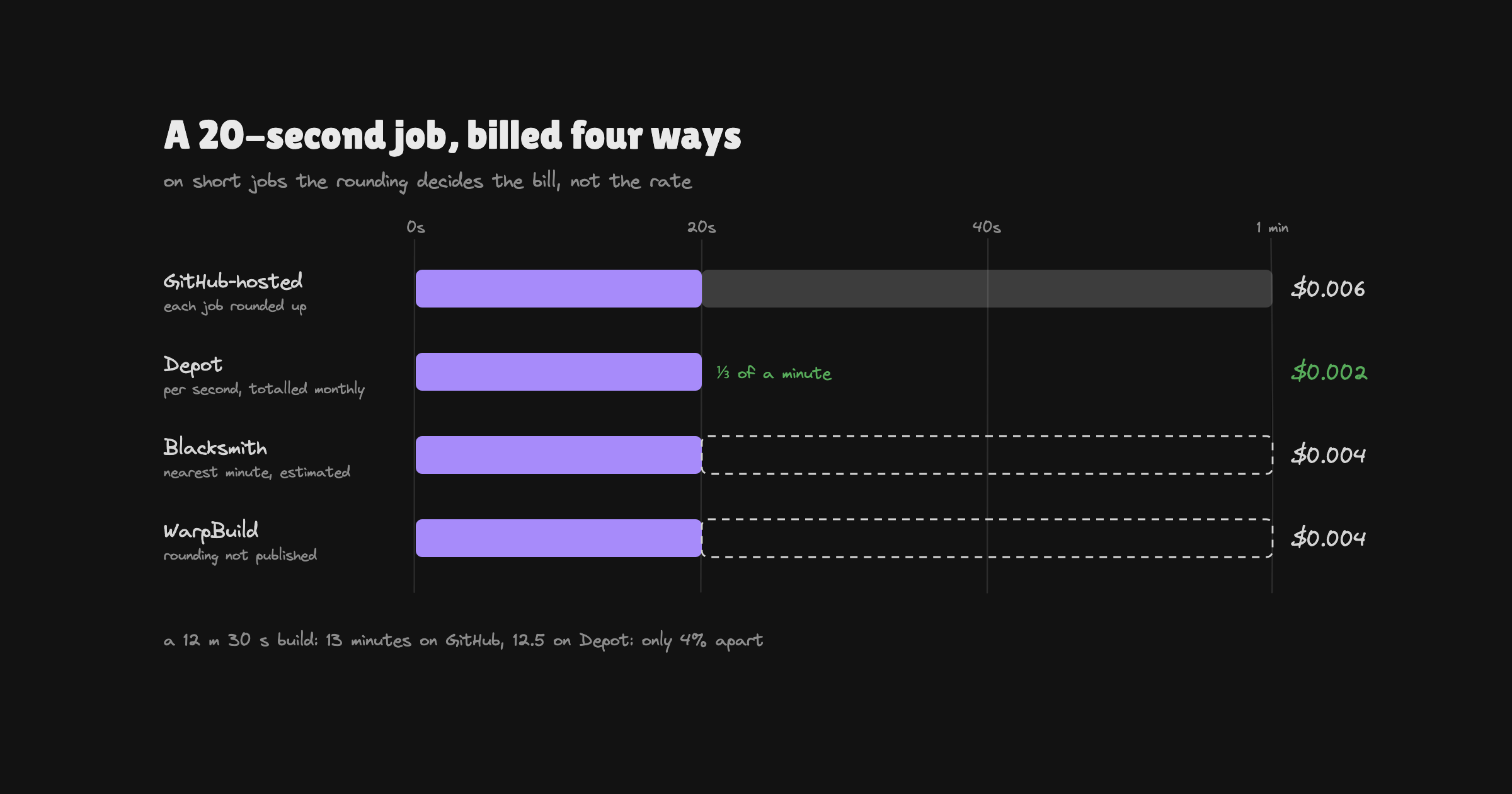
What a GitHub Actions minute really costs on Blacksmith, Depot and WarpBuild
The rate per minute is only part of a GitHub Actions bill. How each provider rounds a job, how far its free minutes go …
Before you register a machine
How does SpockOps work out a machine's payback?
From two figures you enter and one it measures: the purchase price, a fixed monthly running cost for power and hosting, and every job the machine runs, priced at what it would have cost on the equivalent GitHub-hosted runner. Each month the value of the work, less the running cost, pays down the purchase price, and SpockOps projects the break-even date.
What does the fleet dashboard show?
Every self-hosted machine across every connected organization: alerts worst first, load and runner-hours by hour, queue time beside failed jobs, machine health, runner groups and label sets, and a Rebalance Lab that simulates a label change before you make it.
What happens when GitHub removes a runner?
GitHub removes a self-hosted runner that hasn't connected for more than 14 days. When it comes back as a new runner, SpockOps lets you reassign it to the machine already registered, so its purchase price, running cost and history stay together and its payback carries on.
Do we install anything on the machines?
No. SpockOps is a GitHub App and reads jobs and runners from GitHub's webhooks and API. You register each machine's price and running cost in SpockOps; nothing runs on the runner itself.
Get started
Find out what your
machines are worth.
Install the App, register each machine's price and running cost, and SpockOps prices the work it has done over the last 90 days. Nothing installed on the runners.