 SpockOps
Cost intelligence for GitHub Actions
Every minute priced. Every dollar explained.
GitHub sends one total. SpockOps gives every entry a reason. Finance gets a bill that adds up and has an owner; engineers see what costs the most and why: which workflow, runners or AI, passed or failed.
The bill
A total, with none of its reasons
GitHub's usage report adds up minutes by product and day. It can't tell you which workflow drove the jump, what your own machines really cost, or where the rest of the spend went.
-
Which workflow did it
One number, no owner
The bill arrives as totals. Nothing ties a dollar to the workflow, repository or person behind it, so the jump gets argued about rather than fixed.
-
What the machines cost
Self-hosted looks free
Jobs on your own runners never reach the bill, so the machines look free. They have a price, a power bill and a payback date, and nobody is tracking any of them.
-
Where the rest went
The costs that hide
An agent's AI credits sit on another bill, often most of what a run costs. A 20-second job is billed a full minute. Bot pull requests run CI nobody asked for.
The cost engine
From one run to what to change
A run is priced. The month adds up. What's worth changing stands out.
-
1
A run, priced
ci.yml · run #482
- buildLinux$0.05
- testLinux, one retry$0.06
- macos-buildmacOS$0.74
The run$0.85
-
2
The month adds up
acme · November
- Hosted Linux$1,940
- Hosted macOS$930
- Self-hosted$840
- AI credits$502
The month$4,212
-
3
What to change
- $610release.yml on macOS, the costliest workflow
- $520on failed and retried runs, 12% of the month
- $186in AI credits for the Copilot agent, most of what its runs cost
Where the money hides
Four places the bill doesn't show you
Each one worked through in full, with the numbers, on the blog.
-
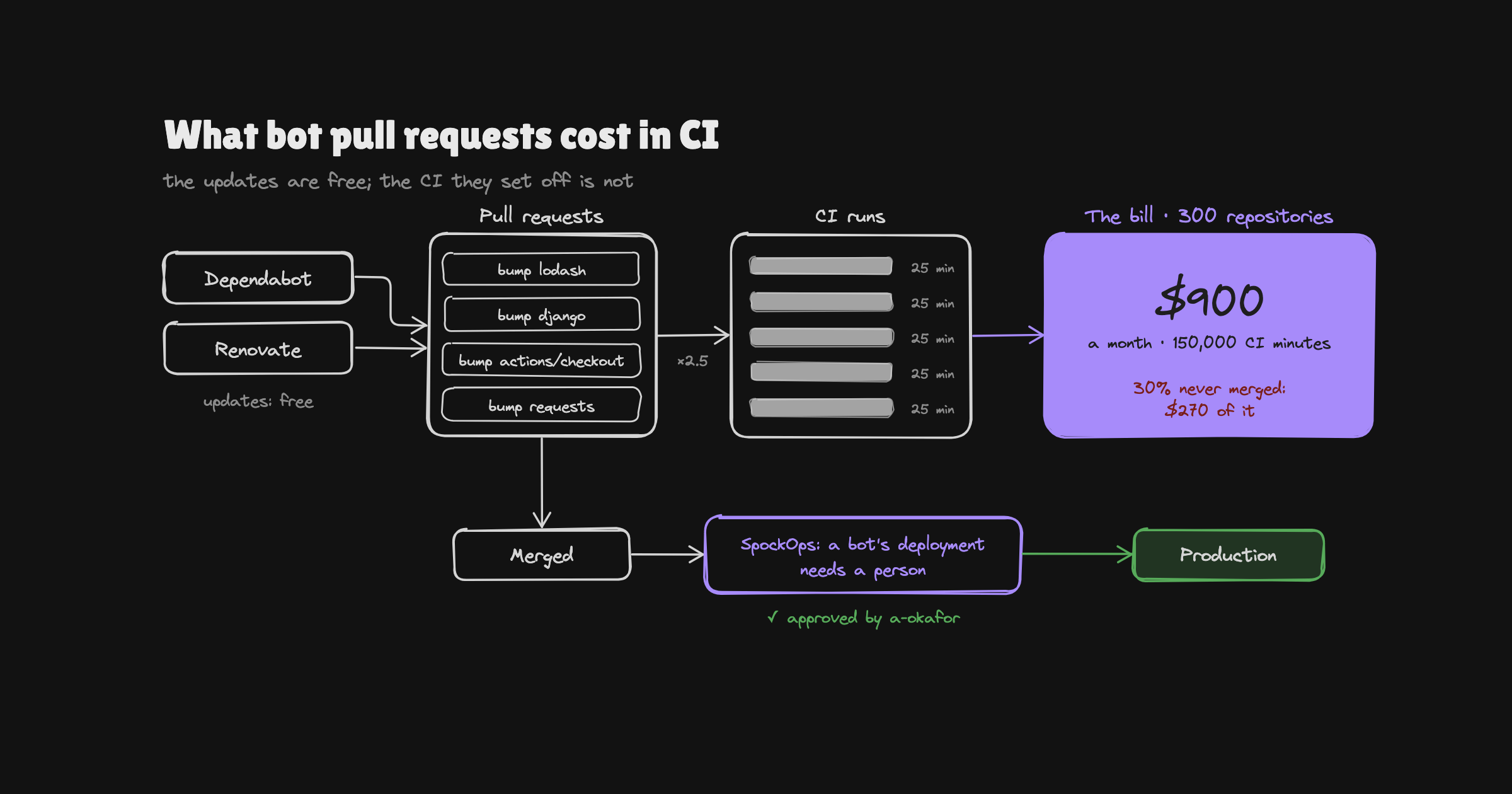
What do Dependabot and Renovate really cost in CI?
Dependabot and Renovate are free. The CI their pull requests set off is not. What dependency bots cost in GitHub Actions, and how to govern what …
-
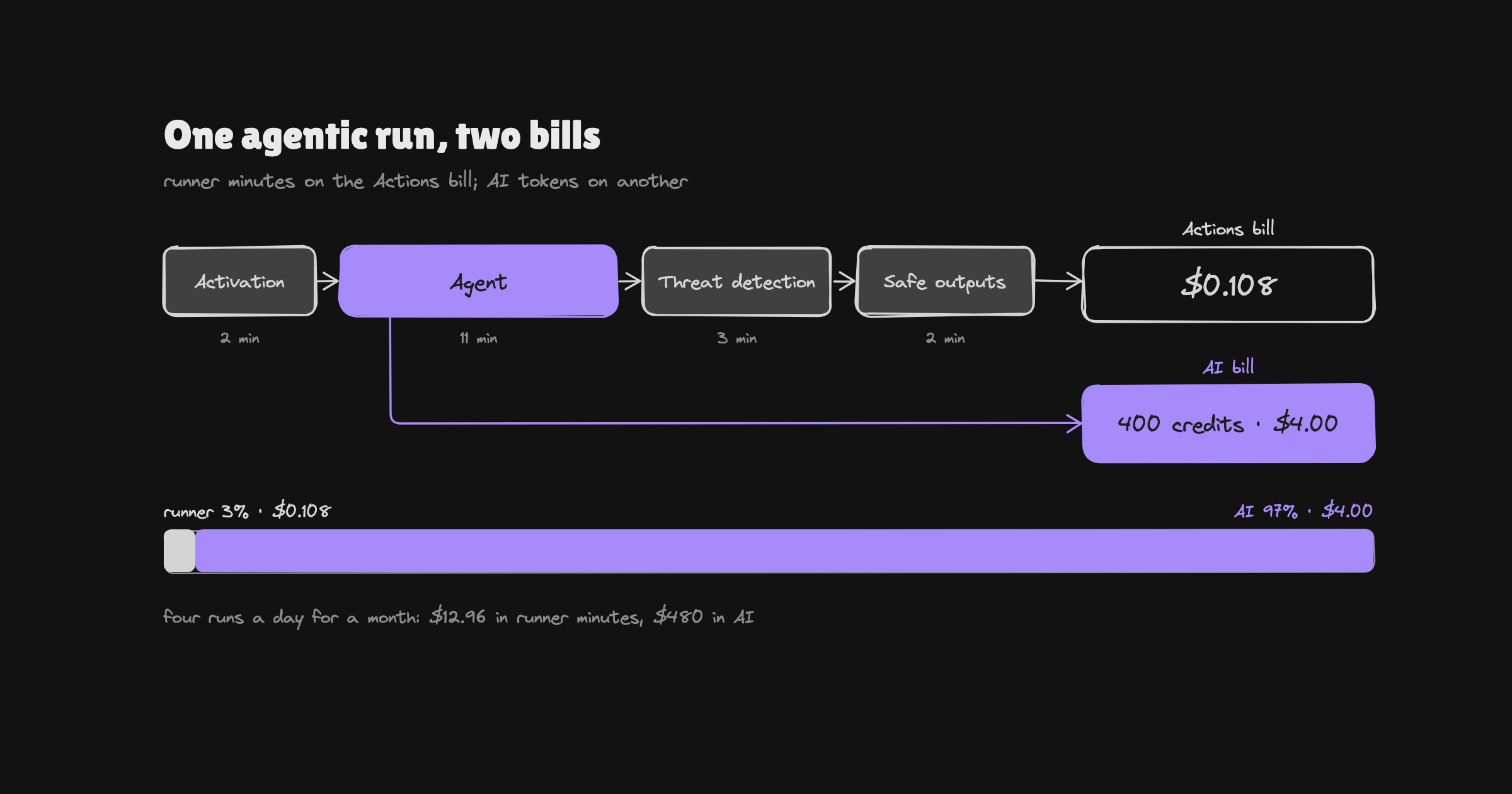
What does an agentic workflow cost? Runner minutes vs. AI tokens
Every GitHub agentic workflow run has two bills: Actions minutes and AI tokens. See a priced example and how SpockOps splits compute from agent cost per …
-
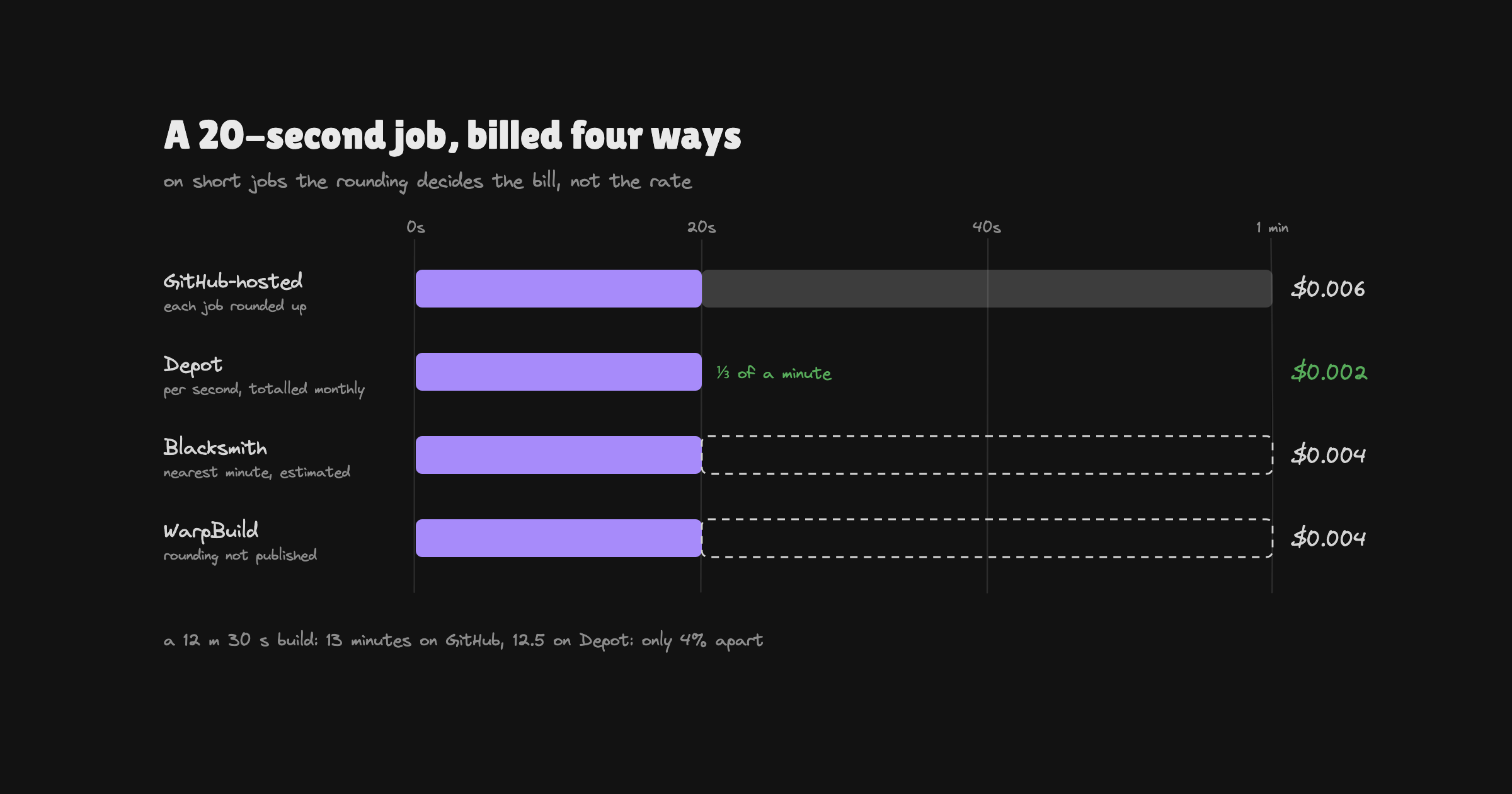
What a GitHub Actions minute really costs on Blacksmith, Depot and WarpBuild
The rate per minute is only part of a GitHub Actions bill. How each provider rounds a job, how far its free minutes go and how …
-
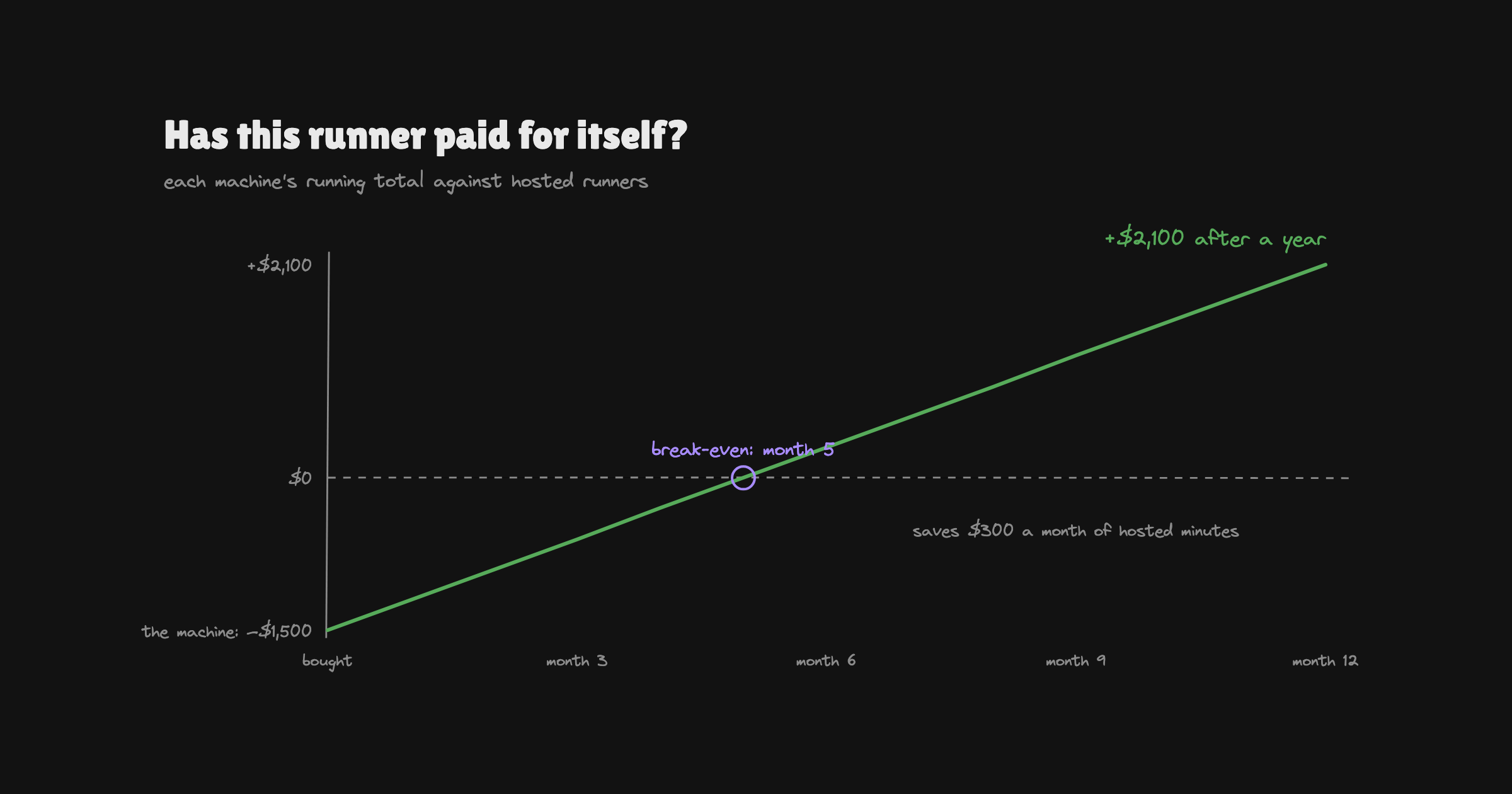
Have your self-hosted runners paid for themselves?
Self-hosted GitHub Actions runners look free because their minutes never reach the bill. A method, and a worked example, for finding each machine's break-even.
Two readers, one bill
For finance, and for the engineers who spend it
Finance needs a bill that adds up and has an owner. Engineers need to know what costs the most and why. SpockOps gives both the same numbers, across every runner and the AI.
-
For finance
A bill that adds up, with an owner
- Every runner and the AI on one bill
- Net of free minutes, by each provider's own rounding
- Every dollar by organization, repository and who started it
-
For engineers
What costs the most, and why
- The costliest workflows, jobs and steps
- Runner minutes beside AI credits, per agent
- Spend by outcome: success, failure, cancelled
Beyond GitHub's usage report
What GitHub provides, and what SpockOps adds
GitHub's billing tells you what you owe. SpockOps tells you why, and what to change.
| Question | GitHub natively | SpockOps |
|---|---|---|
| What did each job cost? | A usage report of minutes by product, SKU and day | Every job and step priced at its runner's rate, net of free minutes |
| Which workflow drove the bill? | Totals by repository | Cost by workflow, job, step, commit and who started it, across every organization |
| What do our own machines cost? | Nothing: self-hosted minutes aren't billed | Each job at the hosted equivalent, and every machine's payback date |
| Third-party runners? | Not shown | Blacksmith, Depot and WarpBuild, priced by their own rules, on the same bill |
| What do agents cost? | AI credits on a separate bill | Every agentic run split into runner minutes and AI credits, at the payer's rate |
| What did failures cost? | Not shown | Spend by outcome: success, failure and cancelled, with retries counted |
Before you price your first month
Why did my GitHub Actions bill go up, and which workflow did it?
GitHub sends one total. SpockOps prices every job and step as it runs, at GitHub's rate for that runner and operating system and net of your free minutes, then rolls it up by workflow, repository, who started it and organization. Open the month and sort the workflows by cost.
Our self-hosted runners are free, right?
Their minutes never reach the GitHub bill, so they look free. SpockOps prices each job on them at the equivalent hosted rate, and gives every machine you register a payback schedule: its price and running cost against the work it has done, with the month it breaks even.
Does it cover Blacksmith, Depot and WarpBuild?
Yes. Jobs on them are priced at each provider's rate and rounding, beside GitHub-hosted and self-hosted jobs, so a mixed fleet is one bill.
What about AI agents?
An agentic workflow run has two bills: Actions minutes and AI credits. SpockOps splits every run into its runner cost and its AI cost, at the rate the payer is charged, so you can see which agents cost what.
Do we have to change our workflows?
No. SpockOps is a GitHub App and works from GitHub's webhooks and API. Install it on an organization and up to 90 days of history syncs in, priced.
Get started
Last month's bill,
explained.
Install the App on one organization and up to 90 days of runs sync in, every job priced. No changes to any workflow or repository.